Home Security Camera: Camerito
- 4.4
- Rating
- 10.00K
- Installs
- Free
- Price

 Analysis by App-foxy
I like the idea behind Home Security Camera: Camerito because it gives an old phone a useful second life instead of leaving it in a drawer. This free House & Home app from TappyTaps s.r.o. turns a spare device into a WiFi-connected camera for viewing live video, receiving alerts, and keeping clips. That sounds simple, but the real value is in the situations where buying a dedicated camera feels excessive: checking on a pet for a few hours, watching an entryway during a delivery window, or keeping an eye on a room while you are elsewhere in the home.
After using it, my view is that Camerito is best understood as a practical monitoring tool rather than a complete replacement for a purpose-built security system. It can make an unused phone useful very quickly, and the familiar phone hardware means there is no separate camera body to install. At the same time, the experience depends heavily on the spare phone, its battery, its position, and the reliability of the WiFi connection. The clever part is the reuse of hardware; the main compromise is that the hardware is still an ordinary phone.
Why turning a spare phone into a camera matters
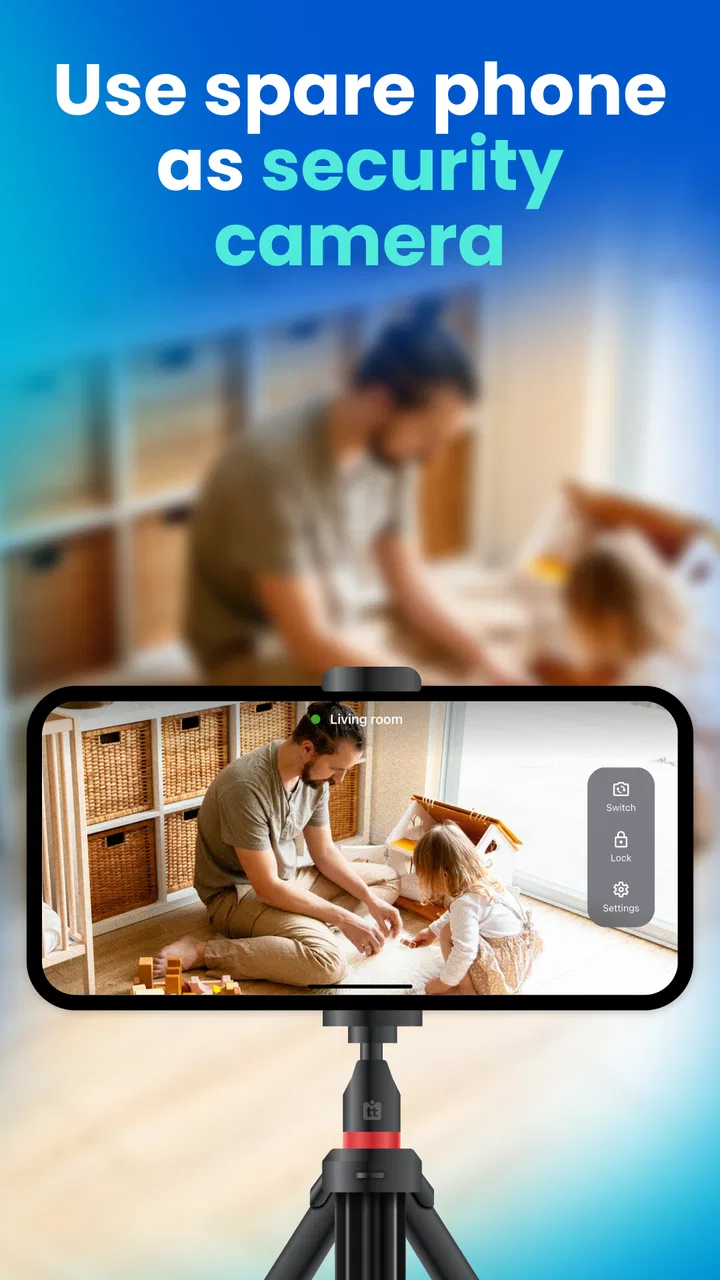
The central capability is straightforward: one phone acts as the camera, while another device can be used to view what is happening. In practice, that changes the cost and effort of setting up temporary monitoring. I do not need to buy a dedicated indoor camera simply to watch a hallway during a renovation, check whether a child has fallen asleep, or see what a pet is doing while I am in another room.
You May Also Like

 AccuWeather: Weather Radar
AccuWeather Review: A Quick, Clear Forecast for Everyday Decisions
For everyday plans, the best forecast is the one you can understand quickly. AccuWeather makes rain timing, radar, and local conditions easy to act on, with a few trade-offs.

 Hill Climb Racing
Why Hill Climb Racing Still Turns Crashes Into One More Run
A tiny car, a bumpy hill and one more upgrade: Hill Climb Racing keeps resurfacing because its simple chaos makes every near-miss feel personal.

 AliExpress - Shopping App
AliExpress Makes Global Shopping Feel Personal, but Shoppers Bear the Risk
AliExpress turns a global marketplace into a pocket-sized discovery engine. Its reach is useful, its shopping loop compelling, and its trade-offs easy to miss.

 Lords Mobile: Kingdom Wars
Lords Mobile Is a Kingdom-Building Routine, Not a Quick Match
A case-by-case verdict on the building, battles, device demands, and social commitments that make Lords Mobile rewarding for some players and exhausting for others.

 PDF Scanner app - TapScanner
TapScanner Makes Paperwork Easier to Capture, Check, and Share
TapScanner makes scanning with a phone feel less like a rescue operation and more like a dependable step in getting work done. Its capture tools are useful, though not flawless.

 Block Blast!
 Shows How Much a Puzzle Game Can Leave Out
A quiet grid game shows why puzzle players increasingly value instant clarity, repeatable skill and low-pressure play—and where the genre still needs to catch up.
More From Our News Desk
View All News


The app is particularly appealing when the spare phone already has a decent camera and can remain connected to power. A retired handset may still offer a perfectly usable lens, screen, microphone, and wireless connection even if it is no longer suitable as a daily phone. Camerito makes those leftover components relevant again. That is a more convincing benefit than simply saying it is inexpensive: it reduces the number of devices I need to purchase and gives an otherwise idle phone a clear job.
Live video is the feature I noticed first because it answers the most immediate question: what is happening right now? Alerts and clips make the camera more useful when I cannot watch continuously. Instead of keeping a monitoring screen open all day, I can use the system as a way to draw attention to activity and then review what was captured. The distinction matters for everyday use. A live feed is good for checking; alerts and clips are better for discovering that something happened while I was away.
I would not treat that combination as a promise of professional surveillance. A phone camera has a limited field of view compared with some dedicated indoor cameras, and its placement can be awkward. Still, for a spare-room or short-term setup, the convenience is real. Camerito focuses on the one capability that makes old phones valuable: remote visual awareness without buying another camera.
Setting up the two-device arrangement
The first practical decision is choosing which phone becomes the camera. I would select a device that can stay in one place, remain connected to WiFi, and sit close enough to a power source. A phone with a weak battery may work for a brief check, but it is a poor choice for continuous monitoring. The camera phone should also be positioned so that its screen and lens are not blocked by a case, cable, curtain, or furniture.
The second device is the viewer. This separation is important because it lets the camera phone stay undisturbed. I can leave it pointed at a doorway or pet bed while using my regular phone elsewhere. Before relying on it, I would test the complete arrangement from the location where I expect to view the feed. WiFi can behave differently across rooms, and a setup that looks fine beside the router may be less dependable at the far end of an apartment.
Placement deserves more attention than many people give it. A phone resting flat on a table may show mostly the ceiling or floor, depending on the camera angle. A stable stand is better than balancing the device against books, especially if alerts are important. I would also avoid placing the phone behind glass or directly beside a bright window. Reflections and backlighting can make the live view much less useful even when the connection itself is working perfectly.
There is another small but meaningful workflow improvement: decide what you actually want to observe before positioning the phone. Monitoring a pet’s bed calls for a close, low angle. Watching a front door needs a wider view of the approach, not just the handle. Checking a sleeping child requires a quiet, stable location where the phone will not be knocked over. Camerito can provide the connection, but the quality of the result still depends on this physical planning.
What live video, alerts, and clips change in daily use
Live video is most useful when I already have a reason to check. For example, if I hear a noise in another room, I can look at the feed before walking over. It can also settle small uncertainties: whether a pet is in its usual place, whether a delivery has been left near the entrance, or whether a room is empty before I enter. This kind of use is less demanding than constant security monitoring and suits the phone-based approach well.
Alerts change the rhythm. Instead of opening the viewer repeatedly, I can wait for an event to draw my attention. That reduces unnecessary checking, but it also means I should not assume that every alert will be equally useful. A camera pointed at a busy walkway may create more notifications than I want. A phone facing a quiet room is likely to be easier to live with. The best setup is not necessarily the one with the widest view; it is the one that produces information I can act on.
Clips are valuable because they preserve a moment I did not watch live. I find this especially useful for short absences. If I leave a pet alone, I may not need a continuous recording session; I may only want to know whether anything unusual happened. Reviewing clips can answer that more efficiently than staring at a live feed. It also makes the app more practical for people whose day does not allow them to keep a monitoring window open.
A useful habit is to test the alert behavior during a harmless situation before trusting it for something important. Walk through the monitored area, move an object, or have someone enter the frame, then check how the notification and clip appear on the viewer. This is not about inventing a security guarantee; it is simply good setup discipline. It helps reveal whether the phone is aimed correctly and whether the chosen location creates too much background activity.
The strongest everyday scenario: temporary pet and room monitoring
The scenario where I would recommend Camerito most readily is temporary indoor monitoring with a clear, limited purpose. Imagine leaving a dog at home for an afternoon after moving its bed to a different room. I could place a spare phone near the bed, connect it to power, and use the main phone to check the room. Live video would let me look in when I wanted, while alerts and clips could show whether the dog became active or moved around during the absence.
This works better than buying a dedicated camera when the need is occasional or uncertain. Perhaps I am caring for a newly adopted pet and want to understand its routine for a few days. Perhaps a family member is recovering at home and I need a simple way to check the room without repeatedly opening the door. Perhaps I am waiting for a repair visit and want to know when someone has arrived. In each case, the spare phone can be positioned for that particular task and removed afterward.
The trade-off becomes clearer in this scenario. The phone needs a stable surface, a reliable power connection, and a useful angle. If the pet can reach the cable, the setup may be unsuitable. If the room is dark, the phone’s camera may not provide the kind of visibility someone expects from a dedicated night-monitoring product. If the WiFi signal is weak, remote viewing becomes frustrating. These are not minor details; they determine whether the arrangement is convenient or merely improvised.
I would also be careful about privacy and consent. A camera pointed into a shared room can capture other people, visitors, or private conversations. Before using any monitoring app in a family space, I would explain where the phone is and what it is being used for. For a doorway or common area, the angle should stay limited to the area I genuinely need to observe. Reusing an old phone is easy, but responsible placement still matters.
Where the phone-camera approach falls short
The most obvious limitation is endurance. A spare phone designed for occasional use may not be comfortable running as a camera for long periods, particularly if its battery is old. Keeping it plugged in solves one problem but introduces another: the cable must be routed safely, and the phone should not become hot or easy to knock down. I would never place it where a child or animal could pull the device or cable.
The second limitation is coverage. A phone camera sees what its lens sees. Unless the device has been positioned carefully, a doorway, floor area, or corner may remain outside the frame. Dedicated cameras often make positioning easier because they are designed for fixed mounting, while a phone may need a stand or improvised support. Camerito makes the software side accessible, but it cannot change the physical viewing angle of the handset.
There is also a difference between checking a room and protecting a property. For a quick visual check, the app is a sensible option. For someone who wants a permanent system with purpose-built mounting, broad coverage, or a more specialized security setup, a dedicated camera may be the better investment. I would skip Camerito if the goal is to monitor several areas at once or build a long-term installation around equipment that can be left untouched.
Notifications can be helpful, but they are not automatically the same as reliable security detection. A busy environment may produce repeated activity, while a poorly positioned phone may miss what matters. I would use alerts as a prompt to look at the situation, not as proof that every important event will be identified. That distinction keeps expectations realistic and is one of the main reasons I see this app as a flexible household aid rather than a professional alarm system.
Cost is another point in its favor, but it needs context. The app is free to install, while in-app purchases range from $2.99 to $79.99 per item. I would check the available purchase choices inside the app before committing to a long-term workflow, especially if I only need temporary monitoring. The free starting point makes experimentation easy, but the total value depends on which functions I need and how often I plan to use them.
Who benefits most from Camerito
I think Camerito suits people who already have a spare phone and want a quick, adaptable camera for one indoor location. It is a good match for renters, pet owners, parents who need occasional room checks, and anyone testing whether remote monitoring is useful before buying dedicated hardware. The app’s Everyone content rating also makes it broadly approachable as a household utility, though adults should still handle placement and privacy decisions carefully.
It is also useful for short projects. During a home repair, I could use an old phone to watch a room where tools or materials are being stored. While waiting for a delivery, I could point it toward an entrance rather than leaving my main phone there. When the task is finished, I can put the spare phone away and reuse it later. That temporary quality is one of the strongest reasons to choose this approach over installing a permanent device.
I would be less enthusiastic for someone who does not own a suitable spare phone, has unreliable WiFi, or needs a camera that can be mounted securely for months. In those cases, the apparent saving may disappear once a stand, replacement battery, or additional hardware is needed. A dedicated indoor camera is likely better when the priority is dependable permanent placement rather than making use of equipment already on hand.
The app’s current version is 4.8.0, and it supports devices running Android 7.0 or later. That makes it relevant for many older Android phones, which is important because the whole concept depends on recycling an existing handset. Still, compatibility alone does not guarantee a good experience: an older phone may have a weak battery, a slow connection, or a camera that performs poorly in the intended room. I would test the actual device rather than judging it only by its age.
My final view after weighing convenience against control
Camerito succeeds because it focuses on a practical problem: I may already own the camera hardware I need, even if I no longer use that phone as a phone. Live viewing, alerts, and clips turn that spare device into something useful for temporary home monitoring. The setup can be cheaper and more flexible than buying another camera, especially when the need is limited to one room and a specific period.
Its weaknesses are equally tied to that design. The phone must be powered, positioned, connected, and protected from being moved. The result depends on the handset’s camera and battery rather than on hardware designed specifically for surveillance. I would not choose it as the foundation of a complex, permanent security system, but I would happily try it before spending money on one for a simple household task.
The app has a 4.4 average from around 500 ratings, with over 10 thousand installs, which suggests that it has found a real audience without making it look like an established enterprise platform. It was released on November 19, 2024, so I would approach it as a relatively recent tool and judge it by how well it handles my particular setup. My recommendation is simple: if you have an unused Android phone and a clear one-room monitoring need, Camerito is worth trying; if you need permanent, wide-area, security-focused coverage, choose dedicated hardware instead.
That is the balance I would explain to a friend. This is not magic, and it does not remove the practical work of placing a camera responsibly. But it can turn a forgotten phone into a useful pair of eyes for a pet, a room, or a short-term home situation. For that focused purpose, the idea is both sensible and genuinely handy.
FAQs for Home Security Camera: Camerito
01What is Home Security Camera: Camerito?
Home Security Camera: Camerito is a mobile app designed to turn compatible smartphones or tablets into security cameras. It can help you monitor a room, entrance, pet area, or baby’s space from another device. Before downloading, check that your phones support the app and that both devices can maintain a stable internet connection for reliable remote viewing.
02How does Camerito work, and what devices are required?
The app generally requires two devices: one positioned as the camera and another used as the viewer or monitor. After installing Camerito, you normally pair the devices through the app and grant access to the camera, microphone, and network. For the best experience, keep the camera device connected to power and place it where Wi-Fi coverage is strong.
03Does Home Security Camera: Camerito record video or audio?
Camerito may provide live video monitoring and could include audio, alerts, or recording-related features depending on the version and device platform. Users should review the permissions and feature descriptions shown in the official app listing before relying on it for continuous surveillance. Also remember to follow local privacy laws and inform people when recording may occur.
04Is Camerito a replacement for a professional security system?
No, Home Security Camera: Camerito should be considered a convenient monitoring tool rather than a complete professional security system. A smartphone can lose power, disconnect from Wi-Fi, overheat, or stop working because of operating-system restrictions. It may be useful for checking a room or receiving basic notifications, but it should not be your only protection for valuable property or emergencies.
05Is Home Security Camera: Camerito free to download and safe to use?
The app may be available to download at no initial cost, although some functions can depend on advertising, in-app purchases, subscriptions, or platform-specific limitations. Before installing, inspect the current store listing, developer information, ratings, and requested permissions. Avoid placing the camera in private areas, use strong account credentials when available, and keep the app and devices updated.
Pros
- Live video lets you check your home remotely from your phone.
- Motion alerts can help you notice unexpected activity quickly.
- Useful for monitoring pets
- children
- entrances
- or empty rooms.
- Remote access makes it convenient to check multiple locations.
- A dedicated security camera app is generally easy to use.
Cons
- Video quality and performance depend heavily on your internet connection.
- Cloud recording or advanced features may require a paid subscription.
- Privacy can be a concern when cameras operate inside your home.
- Continuous monitoring may consume significant battery and data.
- Compatibility can vary between camera models and mobile devices.

Home Security Camera: Camerito
Gallery